
Build the checklist once
Pick a template and edit it, or start empty. Say which questions you ask, which documents are required, and who has to provide each one. Save it and it is your standard from then on.
Client information & document collection software
Send one checklist for answers, forms and supporting files. Clients see what is missing, your team reviews each item, and automatic reminders handle the follow-up. No password for clients to remember.
Free trial · No card needed · Set up in about ten minutes
Intaky is new. No customer logos here yet, because there are none to show. What there is: a product you can sign up for right now, use for free, and email the person who built it when something is wrong with it.
None of that is a filing problem. It is that the request, the files and the decision all live in different places, and only one person is holding the thread together.
Pick a template and edit it, or start empty. Say which questions you ask, which documents are required, and who has to provide each one. Save it and it is your standard from then on.
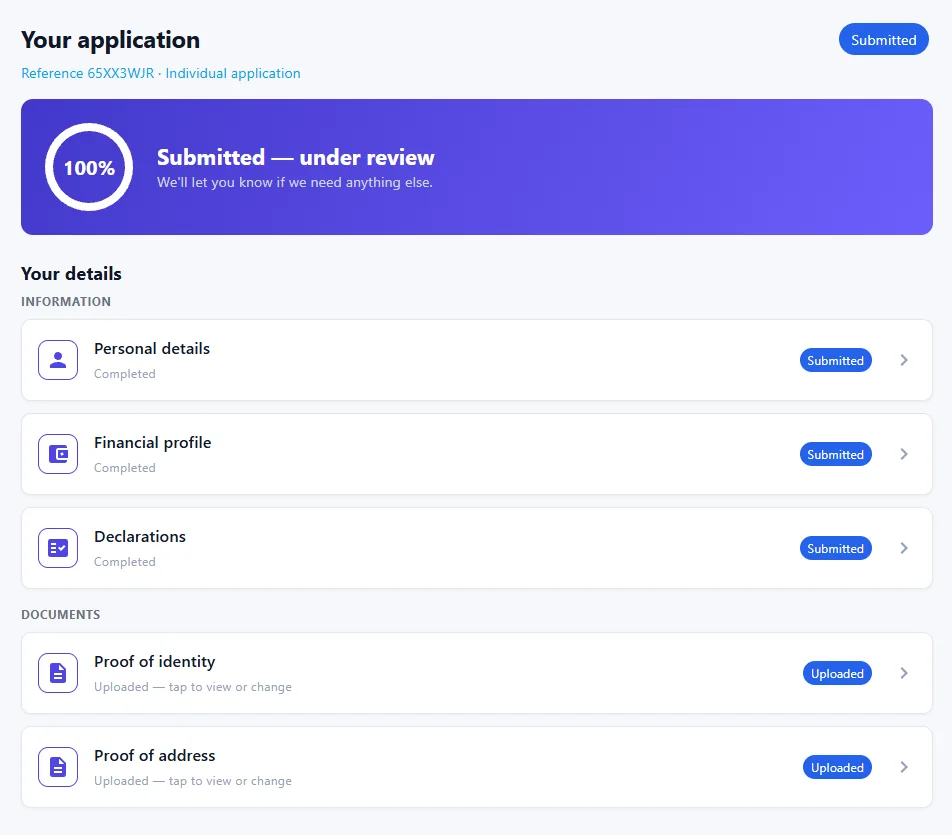
Your client works through it at their own pace, on a phone if that is what they have. Nothing is submitted until the required items are actually there, so a half-finished application never lands on your desk.
Accept what is right. Send back what is not, with a note saying why. The client only sees the items you flagged, fixes those, and returns it.
From information request to accepted file
Intaky is document collection software for work that starts with a client sending you information. Build the questionnaire and file requests once, then track what is missing and what needs a correction.
Collect contact details, company information, service requirements and declarations beside the files that support them. Give each contributor a clear part to complete.
Client information collection →A branded client upload portal shows the checklist, progress and review notes. Clients open an email link, with no password to create or remember.
Explore the client document portal →Automatic email reminders bring contributors back to their outstanding work. Your team reviews each item and requests a replacement only where it is needed.
See how document reminders work →Free templates
Preview six client information forms and document request checklists. Download an editable CSV without signing up, then tailor the questions, file instructions and ownership to your process.
Most business applications need things from several people: the director, the beneficial owner, the person who actually has the bank letter. Invite them individually. Each one gets their own section and sees nothing else, and you can tell at a glance who has not started.
When you reject two items out of nine, the other seven stay accepted and locked. Your client opens the portal and finds exactly two things to fix. They cannot quietly change the answers you already approved.
Who accepted the passport, when, and what they wrote about it. The trail is the point, not a by-product — it is what you reach for when a file is questioned a year later.
Export a finished case as a PDF summary with its documents attached, or have a webhook push it straight into whatever you already run. Intaky does not need to be the last stop.
Built around a few kinds of work in particular, because they share the same shape: a fixed list of documents, several people supplying them, and a decision at the end.
Onboarding a new client, or the same twelve documents from the same forty clients every January. Reusable checklists mean you set it up once and send it every year.
Client onboarding for accountants →Identity checks, engagement paperwork, evidence from a client who is not enjoying the process. The audit trail matters here more than the time saved.
Client intake for law firms →Right-to-work documents, references, qualifications. Usually against a start date, which is what makes chasing them by email expensive.
Onboarding documents for recruiters →KYC, vendor and contractor onboarding get their own page, because a company is not one person. There is a starter template, and a page, for tenant applications, lending, investment accounts, insurance, grants, admissions, patient intake, visas and more — see all industries.
A fair question to ask of a new product, so here is the specific answer rather than a badge.
No system is perfectly secure and we would rather say so. Found something? [email protected].
Every plan has the whole product and as many team members as you like. You pay for how many new applications you take in each month, and for storage.
$0for 14 days
Try it on real clients before you pay.
No card needed
$49/month
A small practice onboarding steadily.
Cancel any time
Most popular
$149/month
A team taking in clients every week.
Cancel any time
$399/month
Several teams, or high volume.
Cancel any time
Prices in US dollars, billed monthly. Any sales tax or VAT is worked out at checkout by our payment provider. Choosing a plan takes you to your workspace's billing page, or to creating a workspace if you do not have one yet. You can turn off auto-renew or cancel from that page.
That wants a contract and an invoice rather than a checkout button. Tell us your volume and we will size a plan for it.
Two other ways this works. We can build the process around how your intake actually runs, rather than bending it to a generic form. And where the data cannot sit on shared infrastructure — a regulator, a procurement rule, a client who insists — it can run as its own deployment in a region you pick. Tell us what you are working with.
Clients open a secure link from their email and continue to their own checklist. No password to create or remember, nothing to install and no app to download. This device stays signed in for return visits; if the session expires, they can request a new email link.
Invite them. Each person gets only their own sections and document requests. Whoever started the application can see how far everyone else has got, which is usually the bit people want.
Private object storage that is never publicly addressable. Every download goes through an endpoint that checks who is asking, so a leaked link is not a leaked passport.
Export a case as a PDF summary with its documents, or have a webhook push it into your own system the moment it is approved.
There is a free trial with 15 new applications a month, and no card is needed to start. It lasts 14 days. Paid plans are $49, $149 and $399 a month, by how many new applications you take in; every plan has the whole product and unlimited team members. See the plans.
New enough that you would be an early customer, and we would rather you knew that going in. The product works and you can try the whole thing for free. What you would not get yet is a long list of reference customers.
Ask what it does, describe the intake you are stuck with, or tell us what is wrong with the product. Answers come by email, written by hand, usually within a business day.
Build one checklist, send one link, and see whether the chasing stops.
Create your workspaceFree trial · No card needed